How BCMEA stat holiday pay actually works
Stat holiday pay sits in an awkward spot on the longshore paycheque. It's not work pay. It's not vacation. It's a separate cheque that follows its own rule, and that rule trips up a lot of guys. Most members can't tell you, off the top of their head, what they're owed on a holiday they didn't work, or how close they are to qualifying for the next one. If you've ever looked at a December stub and wondered whether the stat line was right, you're not alone. Here is what the rule actually says, and at the end, the fastest way to check your own number.
The 13 recognized holidays
There are 13 recognized holidays in the agreement:
- New Year's Day (Jan 1)
- Family Day (BC, February)
- Good Friday
- Easter Monday
- Victoria Day
- Canada Day (Jul 1)
- British Columbia Day (first Monday in August)
- Labour Day (first Monday in September)
- National Day for Truth and Reconciliation (Sep 30)
- Thanksgiving Day (second Monday in October)
- Remembrance Day (Nov 11)
- Christmas Day (Dec 25)
- Boxing Day (Dec 26)
Those are the days. The question is what you get paid on each one.
If you work the holiday
If you actually work the recognized holiday, the rule is simple: you're paid at 2.00 × STBR for the shift. That's the holiday rate.
The complication is on the days you don't work.
If you don't work the holiday: the 15-shift rule
This is the rule most members are asking about. There's a four-week counting period before the holiday. What you did in that window determines what you're paid.
- 15 or more shifts worked in the preceding 4 calendar weeks: paid 8 hours at STBR. That's the full not-worked stat pay.
- 1 to 14 shifts worked in the preceding 4 calendar weeks: paid your base rate times 1/20th of the straight-time hours you worked in that period. Partial qualification. The fewer hours you worked, the smaller the stat pay.
- Zero shifts in the preceding 4 weeks: no stat pay.
Two things worth saying clearly, because they get mixed up.
First, the partial figure is your base rate times your straight-time hours, divided by 20. It is not based on your gross. Overtime and shift premiums are left out of it, so a window with a Saturday or a couple of premium shifts in it does not pump up the stat figure the way you might expect. Straight-time hours, at base rate, divided by 20.
Second, the counting period is the 4 calendar weeks immediately before the holiday, not the four weeks of the calendar month. Your local issues a "Stat Holidays and Counting Periods" calendar each year showing exactly which Sunday-to-Saturday weeks count for which holiday. If you don't have it, ask the dispatch hall.
This is the part that's easy to get wrong by hand, especially the partial figure, and it's exactly where a wrong number on your stub hides. DockBook does this math off the shifts you've already logged, so you can see where you stand before the holiday lands. More on that below.
The Vancouver Island exception
There's a separate path for the Vancouver Island Local. Members can qualify by making themselves available every day work was available on Vancouver Island in the preceding 30-day period and accepting all such work. Stat pay under this rule is 2/3 × 8 hours × STBR, not the standard 8 × STBR. That reflects the Island's smaller work volume.
If you're on Vancouver Island, your qualification path is different from the mainland. Worth knowing before you check a stub against the standard rule.
A note on December 24 and 31
No work is performed on December 24 or December 31. Worth knowing if you're trying to make sense of a December paystub, since those days behave differently from a normal stat.
How DockBook handles this
DockBook surfaces the stat tracker right on the calendar screen. It applies the four-week counting period to your logged shifts and shows how many qualifying shifts you have toward each upcoming holiday. If you've logged enough shifts to hit 15, it tells you. If you're under, it shows the partial figure: your base rate times your straight-time hours, divided by 20. You don't have to do the math by hand, and you don't have to wait for the stub to find out you came up short.
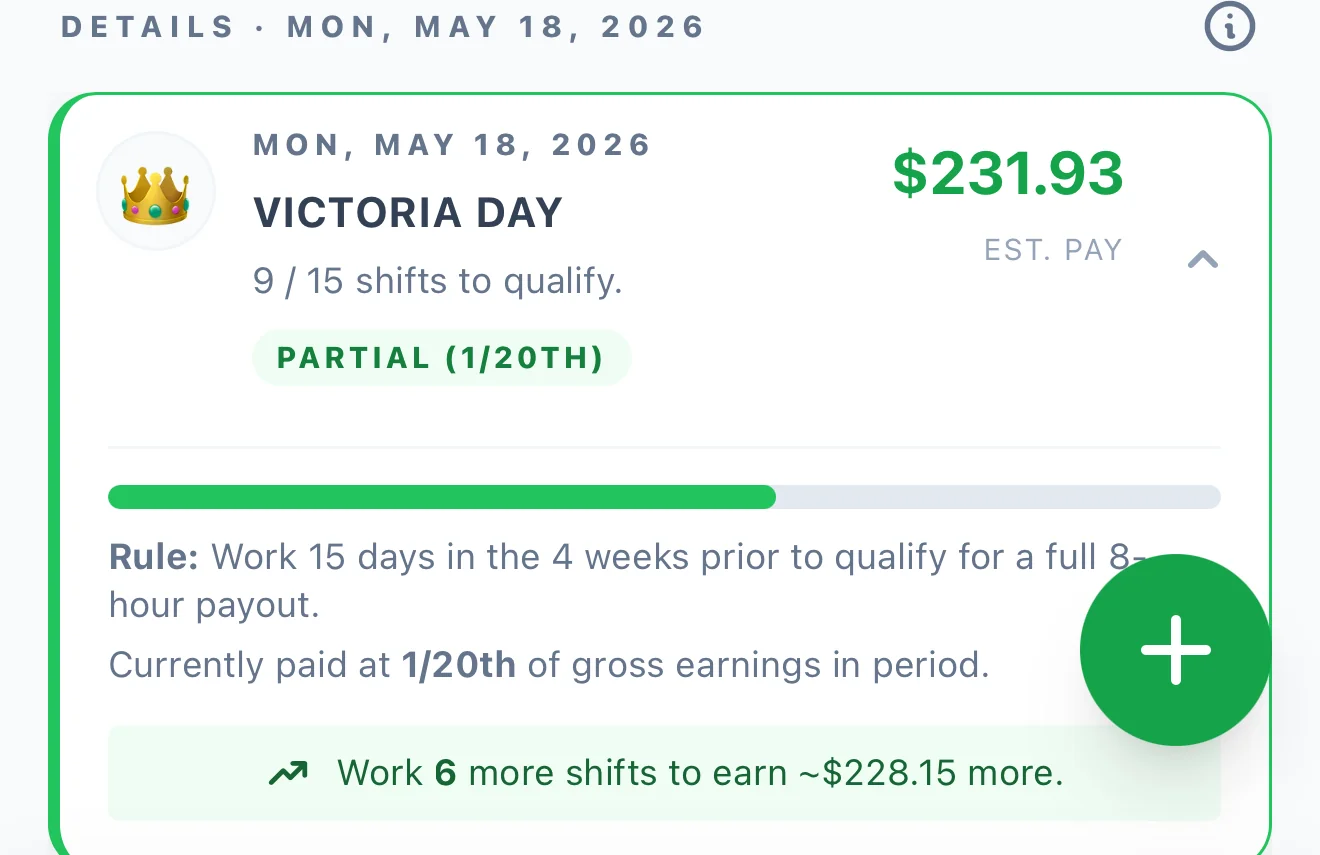
That's the whole point. The difference between hoping payroll got the stat line right and knowing they did is having your own record to check it against.
Check your own number
If you want to see where you stand on the next holiday, the BCMEA stat tracker and pay tools run off your logged shifts and apply the counting-period rule for you. Want to sanity-check a figure right now? The free pay calculator is open to everyone, no account needed.
For another BCMEA rule worth getting straight, see how the WIPP pension actually works.
A note on accuracy
This is a plain-English explainer based on the current BCMEA / ILWU Canada collective agreement. It's not a legal document, not payroll advice, and not a substitute for your local's published "Stat Holidays and Counting Periods" calendar. Always verify a specific stat pay calculation against your local before disputing a paystub.
Spot something out of date or wrong? Email me and I'll fix it.
Frequently asked
How do I qualify for stat holiday pay if I don't work the holiday?
Work 15 or more shifts in the 4 calendar weeks before the holiday and you're paid 8 hours at your straight-time base rate. Work 1 to 14 shifts and you get a partial figure. Zero shifts in that window means no stat pay.
How much is stat pay if I work the holiday?
You're paid 2.00 times your straight-time base rate (STBR) for the shift worked on a recognized holiday.
How is the partial stat figure calculated?
Your base rate times the straight-time hours you worked in the 4-week window, divided by 20. Overtime and shift premiums are left out, so a Saturday or premium shift in the window does not inflate it.
What is the counting period for stat qualification?
The 4 calendar weeks immediately before the holiday, not the four weeks of the calendar month. Your local publishes a Stat Holidays and Counting Periods calendar each year showing exactly which weeks count.
Is Vancouver Island different?
Yes. The Vancouver Island Local qualifies by making yourself available every day work was available in the preceding 30 days and accepting it all. Stat pay there is 2/3 of 8 hours at STBR, not the standard 8 hours.
Have a question about this post or spot something to fix? Email me directly.